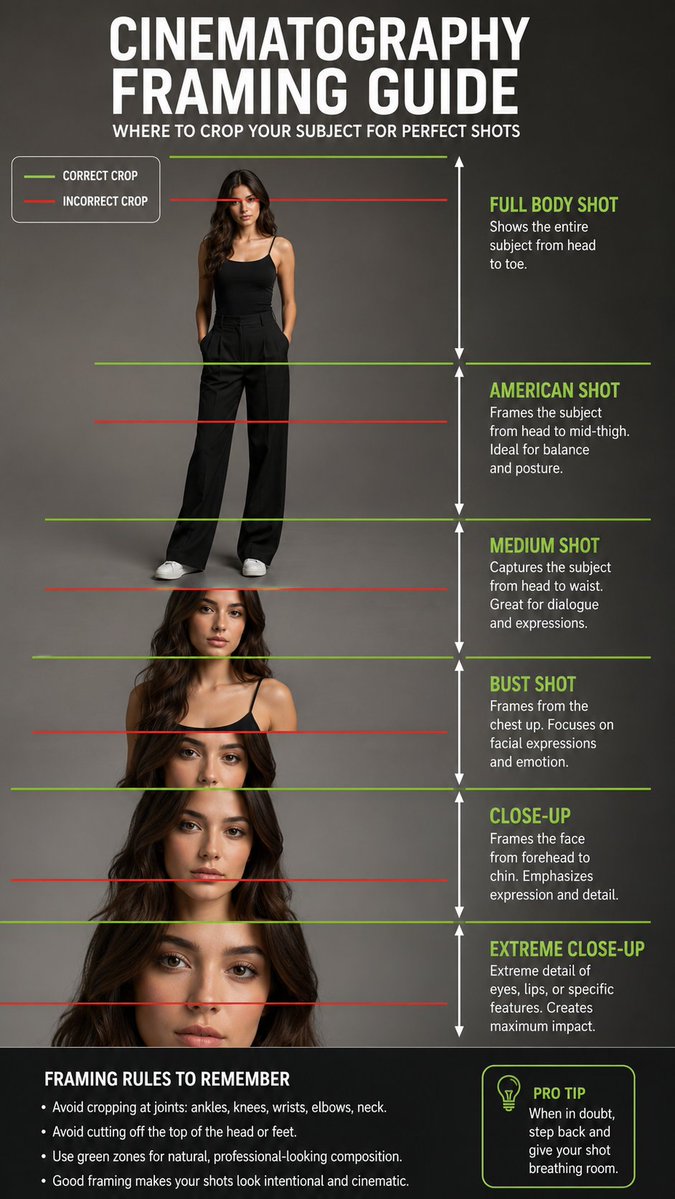
Mastering AI Image Framing: The Secret Behind Professional Visuals.
Most AI images fail not because the prompt is bad but because the framing is wrong. This guide shows where to crop a human subject for clean, cinematic composition.
Green lines = correct crop points
Red lines = areas to avoid
Avoid cutting directly at joints like the ankles, knees, wrists, elbows, neck, or top of the head. These small framing mistakes can make an AI image feel awkward, unfinished, or amateur.
Use this rule when creating portraits, fashion shots, product ads, cinematic characters and AI videos.
Prompt: Create a professional educational cinematography framing guide featuring a full-body female model standing in a clean studio environment. Show multiple camera shot sizes from full body to extreme close up. Add green horizontal guide lines for correct crop points and red horizontal guide lines for incorrect crop points. Include clear labels for Full Body Shot, American Shot, Medium Shot, Bust Shot, Close Up, and Extreme Close-Up. Add white vertical arrows showing the height range of each shot type. The design should look like a professional photography and filmmaking reference chart, with clean typography, realistic human proportions, soft studio lighting, and a neutral gray background.
Negative Prompt: blurry text, distorted anatomy, extra limbs, bad proportions, unreadable labels, messy layout, harsh shadows, low resolution, cropped feet, cropped head, watermark, cartoon style.